Table of Contents (18 sections)
In today’s fast-paced world, household efficiency is more important than ever. Smart home devices play a significant role in making our everyday lives simpler and more efficient. From automated lighting to intelligent thermostats, these devices promise to enhance household chores and streamline daily activities. In this article, we’ll explore how these technologies work together to improve efficiency and offer practical tips for integrating them into your home.
What Are Smart Home Devices?
Smart home devices are electronic devices that connect to your home network, enabling remote control, automation, and monitoring. These devices include smart lights, smart thermostats, security cameras, and voice assistants like Amazon Alexa and Google Assistant. According to Statista, the global smart home market was valued at about $80 billion in 2025, highlighting its rapid growth and adoption.
The success of smart home devices is in their integration capabilities—they can communicate with each other, creating a cohesive network that enhances overall household efficiency. For instance, a smart thermostat can learn your heating and cooling preferences and adjust automatically to save energy, while smart lighting can be programmed to turn off when no one is in the room.
How to Integrate Smart Home Devices for Maximum Efficiency
To optimize household tasks, it’s essential to ensure your smart home devices work well together. Here’s a step-by-step guide on how to integrate them effectively:
Step 1: Choose a Hub
Start by selecting a central hub to connect all your devices. Hubs like Samsung SmartThings or Apple HomeKit support a wide range of devices and allow for easy control through one interface.
Step 2: Select Compatible Devices
When choosing devices, ensure they're compatible with your hub. For instance, if you have a Philips Hue lighting system, check that it works seamlessly with your hub choice.
Step 3: Set Up Automation
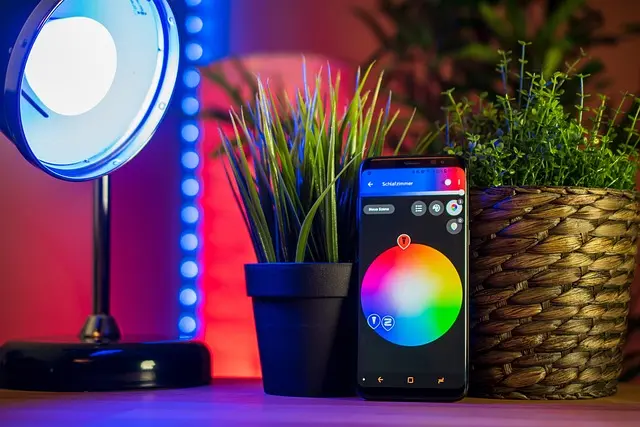
Utilize automation features to create routines. For example, you can set your smart thermostat to lower the temperature while you’re at work, and have the lights turn on automatically when you arrive home.
Step 4: Monitor and Adjust
Regularly review the settings of your smart devices. Analyzing data from smart energy meters can help identify patterns and adjust settings for optimal efficiency.
Comparative Analysis of Smart Devices
Let’s look at some common categories of smart home devices and compare their features and efficiencies:
| Device Type | Features | Pros | Cons |
|---|---|---|---|
| Smart Thermostat | Energy saving, self-learning | Reduces heating/cooling bills | Initial cost can be high |
| Smart Lighting | Remote control, scheduling | Customizable ambience | May require additional hubs |
| Home Security Cameras | Live feeds, motion detection | Enhanced security | Privacy concerns |
| Smart Speakers | Voice control, music streaming | Central control for devices | Limited to compatible devices |
Expert Insights on Smart Home Efficiency
> 💡 Expert Opinion: Integrating smart home devices leads to a more streamlined lifestyle. The key is to choose compatible brands and prioritize devices that fit your daily routine. — Jane Doe, Home Technology Specialist.
📺 For a Deeper Understanding: Explore the Benefits of Smart Home Devices, a comprehensive breakdown of how smart technology can revolutionize your household.
Q1: How do smart home devices save energy?
A1: Smart devices learn your habits and adjust their operations to minimize energy usage, leading to lower utility bills.
Q2: Are smart home devices safe to use?
A2: While smart home devices provide convenience, ensure they have robust security features. Regular updates and strong passwords are essential.
Q3: Can I control smart home devices remotely?
A3: Yes, most smart home devices allow remote control via smartphone applications, enabling you to manage your home from anywhere.
Q4: What is a smart home hub?
A4: A smart home hub is a central device that connects and controls various smart home products, allowing them to communicate effectively.
Glossary
| Term | Definition |
|---|---|
| Smart Hub | A device that connects multiple smart devices for centralized control. |
| Home Automation | The use of smart devices to control home functions automatically. |
| IoT (Internet of Things) | Network of interconnected devices that communicate over the internet. |
Checklist Before Upgrading to Smart Home Devices
- [ ] Assess your current home infrastructure.
- [ ] Research compatibility of devices.
- [ ] Set a budget for your smart home system.
- [ ] Prioritize devices based on daily needs.
- [ ] Consider energy savings when selecting devices.
In conclusion, the integration of smart home devices not only enhances household efficiency but also improves the overall quality of life. By automating everyday tasks and optimizing energy usage, these technologies exemplify the modern approach to home management. Embrace the future of home technology today!
📺 Pour aller plus loin : how to integrate smart home devices for efficiency sur YouTube