Table of Contents (12 sections)
In today's increasingly connected world, smart home devices offer convenience, security, and energy efficiency. But with numerous options available, selecting the right tech for your home can feel overwhelming. This article provides a comprehensive guide on how to navigate the myriad of choices based on your lifestyle and specific needs.
What Are Smart Home Devices?
Smart home devices are internet-connected gadgets that allow users to control and automate various aspects of their home environment, often via a smartphone app. This includes devices like smart speakers, lighting systems, thermostats, security cameras, and appliances. According to a report by Statista, the global market for smart home devices is projected to reach over $174 billion by 2025, highlighting their increasing adoption and significance in modern living. These devices empower homeowners to manage their homes more efficiently and enhance their quality of life.
One of the key advantages of smart home technology is the ability to control devices remotely, allowing users to monitor their homes from anywhere. For instance, smart security cameras can send real-time notifications if they detect unusual activity, providing peace of mind. Additionally, energy-efficient smart thermostats can adjust heating and cooling based on occupancy, leading to significant cost savings on energy bills.
Step 1: Identify Your Specific Needs and Lifestyle
Before diving into the selection process, assess your lifestyle and the specific problems you want to solve with smart technology. For instance, do you have a busy schedule that necessitates remote access to your home systems? Maybe you're looking for ways to improve security or reduce energy consumption?
A common mistake is purchasing devices based solely on trends or recommendations without considering personal needs. Ask yourself the following questions:
- What is my primary goal with smart home technology? (e.g., security, convenience, energy efficiency)
- How tech-savvy am I? Will I need devices that are user-friendly?
- Are there specific areas in my home that require automation?
Once you have clarity on these aspects, you’ll be better equipped to narrow your choices.


Step 2: Research Available Options
With your needs outlined, the next step is research. Look into the types of devices that align with your goals. This could include:
- Smart Speakers: Great for voice commands and controlling other smart devices.
- Smart Thermostats: Learn your schedule and adjust temperatures accordingly.
- Security Systems: Cameras and alarms that allow remote monitoring.
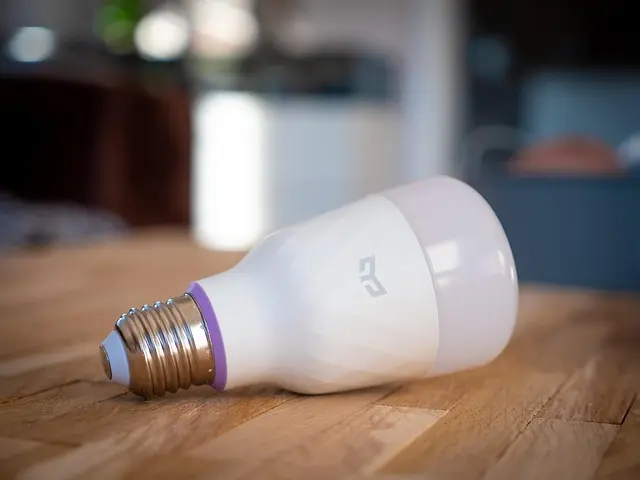
- Smart Lighting: Energy-efficient bulbs that can be scheduled or remotely controlled.
Use online reviews and product comparison sites to weigh the pros and cons of each device. Also, consider forums and community groups to gain insights from other users' experiences. The key is to find devices that not only serve your needs but also integrate smoothly with one another, creating a cohesive smart home ecosystem.
Step 3: Compatibility and Ecosystem
An essential factor in choosing smart home devices is compatibility with existing systems. Most smart devices work within specific ecosystems such as Google Home, Amazon Alexa, or Apple HomeKit. Check if your potential devices are compatible with the ecosystem you're using or plan to use.
Comparison Table of Ecosystems
| Device Type | Google Home | Amazon Alexa | Apple HomeKit | Compatibility |
|---|---|---|---|---|
| Smart Speakers | Yes | Yes | Yes | Voice Control |
| Smart Cameras | Yes | Yes | Limited | Remote Monitoring |
| Smart Thermostats | Yes | Limited | Yes | Energy Management |
| Smart Lighting | Yes | Yes | Yes | Home Automation |
Step 4: Installation and Usage
Next, consider the installation process. Some smart devices require professional installation, while others are designed for easy DIY setup. Read user manuals and watch tutorial videos to familiarize yourself with installation requirements. A smooth installation can make a world of difference in your satisfaction with the product.
The usability of the device is just as important. After installation, spend time learning how to maximize its features. Most devices come with companion apps that offer tutorials on usage.
Tip: Look for devices that offer intuitive user interfaces, as complex setups can discourage long-term use.
Step 5: Keep Security in Mind
With the convenience of smart home technology comes potential security risks. Ensure you take measures to protect your devices and personal information. Update your device software regularly, use strong passwords, and take advantage of two-factor authentication where available. According to Cybersecurity & Infrastructure Security Agency, smart home vulnerabilities can be avoided with basic security precautions. Additionally, you can opt for devices that offer encrypted communications for added protection.


WHALL - 4-in-1 UV Mattress Vacuum Cleaner, 21KPa Anti-Mite Bed Vacuum with Hot Air & LED Display
bestbuy.com

Checklist Before Purchase
- [ ] Identify specific needs and goals
- [ ] Research various smart home devices
- [ ] Ensure compatibility with existing systems
- [ ] Check installation requirements and usability
- [ ] Review security features and protocols
Q1: Do I need a smart hub for my devices?
A1: It depends. Some devices can operate independently, while others may require a hub for full functionality and interoperability.
Q2: Are smart home devices expensive to maintain?
A2: While some initial costs can be high, many devices save money in the long run through energy savings and efficiency.
Q3: How do I assure privacy with smart home devices?
A3: Use strong passwords, enable encryption, and keep your devices updated to secure your information.
Q4: Can I install these devices myself?
A4: Many devices are designed for DIY installation, but always check user manuals for guidance.
Glossary
| Term | Definition |
|---|---|
| Smart Home Hub | A centralized unit that allows communication between different smart devices. |
| IoT (Internet of Things) | The network of interconnected devices that can collect and exchange data. |
| Home Automation | The use of technology to automatically control home systems and appliances. |
> 💡 Expert Opinion: Engaging with smart home technology enhances lifestyle convenience, but careful consideration of device compatibility is crucial for seamless integration.
📺 Resource Video
> For more insights on smart home devices, search on YouTube: "smart home devices 2026 guide to choosing".
Discover our range of smart home devices that are perfect for your needs below. Take your first steps toward a more connected, comfortable lifestyle today!
📺 Pour aller plus loin : smart home devices 2026 guide to choosing sur YouTube
Recommended products
Selected by our experts




